During Flutter mobile application assessments, reFlutter is often the fastest option for bypassing TLS/SSL verification and redirecting traffic to an interception proxy. However, it does not always work. Unsupported engine hashes, debug Flutter engines, missing libapp.so, or newer Flutter versions can prevent the automated workflow from continuing.
This article documents a manual approach for those cases. Instead of relying on precomputed offsets, the exact Flutter engine version used by the target application is identified, the corresponding BoringSSL revision is resolved, and the certificate verification routine is located directly inside libflutter.so. The final offset can then be hooked with Frida to force the verification result to success.
This workflow is intended for authorized mobile application security testing only.
Overview
Flutter embeds BoringSSL inside the Flutter engine. On Android, the relevant code is compiled into libflutter.so. When the application validates a TLS certificate chain, the verification flow eventually reaches a BoringSSL routine responsible for validating the certificate chain and returning either success or failure.
The manual workflow is:
- Extract the Flutter shared libraries from the APK.
- Identify the Flutter engine version or engine commit from the snapshot hash.
- Resolve the BoringSSL revision used by that engine.
- Inspect the BoringSSL source to identify the target verification function.
- Locate the compiled function inside
libflutter.sousing Ghidra. - Convert the Ghidra function address into a module-relative offset.
- Hook the function with Frida and force the return value to success.
This keeps the process deterministic and avoids guessing offsets from unrelated Flutter builds.
When manual is required
The manual workflow is useful when reFlutter cannot process the APK. One common failure is an unsupported Flutter engine hash:
❯ reflutter app-release.apk
[*] Processing...

 Engine SnapshotHash: e80067bfb076e849f6ac3ba5a047eb2e

 This engine is currently not supported.
 Most likely this flutter application uses the Debug version engine which you need to build manually using Docker at the moment.
 More details: https://github.com/Impact-I/reFlutter
In this situation, reFlutter has already extracted the snapshot hash, but it cannot map it to a supported engine offset. The hash can still be used as the starting point for manual analysis.
Another common failure is a missing Flutter application library:
❯ reflutter app.apk
[*] Processing...

Is this really a Flutter app?
There was no libapp.so (Android) or App (iOS) found in the package.

 Make sure there is arm64-v8a/libapp.so or App.framework/App file in the package. If flutter library name differs you need to rename it properly before patching.
If this error appears, verify that the APK contains the expected Flutter libraries, especially: lib/arm64-v8a/libapp.so and lib/arm64-v8a/libflutter.so. If the libraries are missing, extract the correct APK build or confirm whether the application uses a different packaging layout.
Prerequisites
The following tools are used in this workflow:
apktoolorunzip, to extract APK contents.reFlutter, to retrieve or compare Flutter engine snapshot hashes.Ghidra, to locate the compiled verification routine inlibflutter.so.Frida, to hook the target function at runtime.- Basic command-line tools such as
curl,grep,sed,awk,base64, andunzip.
1. Identify the Flutter engine version
If reFlutter already printed the engine snapshot hash, that hash can be used directly. Otherwise, compute the snapshot hash from libapp.so.
The get_snapshot_hash.py script can be taken from the reFlutter repository:
https://github.com/Impact-I/reFlutter/blob/main/scripts/get_snapshot_hash.pyImportant: compute the snapshot hash from
libapp.so, notlibflutter.so. Running the script againstlibflutter.soproduces an invalid result for this purpose.
Example using the wrong file:
❯ python get_snapshot_hash.py app-release/lib/arm64-v8a/libflutter.so
34444444444444444444444444443444
Example using the correct file:
❯ python get_snapshot_hash.py app-release/lib/arm64-v8a/libapp.so
78da37fed6bf1489361a312568249f3f
Next, match the snapshot hash against reFlutter’s engine hash table:
curl https://raw.githubusercontent.com/Impact-I/reFlutter/refs/heads/main/enginehash.csv \
| grep 78da37fed6bf1489361a312568249f3f
Output:
3.41.1,3452d735bd38224ef2db85ca763d862d6326b17f,78da37fed6bf1489361a312568249f3fThis means:
- Flutter version:
3.41.1 - Flutter engine commit:
3452d735bd38224ef2db85ca763d862d6326b17f - Snapshot hash:
78da37fed6bf1489361a312568249f3f
1b. Generate engine hash table (optional)
If the snapshot hash is not found in enginehash.csv, a fresh table can be generated from the reFlutter scripts.
git clone https://github.com/Impact-I/reFlutter
cd reFlutter/scripts/
python gen_enginehash.py
This process clones Flutter release data and can take time because the Flutter repository is large.
❯ python gen_enginehash.py
Cloning into './flutter'...
remote: Enumerating objects: 1116920, done.
remote: Counting objects: 100% (4065/4065), done.
remote: Compressing objects: 100% (590/590), done.
remote: Total 1116920 (delta 3664), reused 3475 (delta 3475), pack-reused 1112855 (from 3)
Receiving objects: 100% (1116920/1116920), 377.52 MiB | 11.92 MiB/s, done.
Resolving deltas: 100% (799956/799956), done.
Updating files: 100% (15517/15517), done.
{'hash': '2c9eb20739dfec95e2c74bd3dfa4601b0a8a36aa', 'channel': 'stable', 'version': '3.41.5', 'dart_sdk_version': '3.11.3', 'dart_sdk_arch': 'x64', 'release_date': '2026-03-18T17:27:24.489637Z', 'archive': 'stable/linux/flutter_linux_3.41.5-stable.tar.xz', 'sha256': '18901d456a5e458c4c69fa7859852b64fac29da9f89476a959abfacbac7f4fdb', 'engine_commit': '052f31d115eceda8cbff1b3481fcde4330c4ae12'}
3.41.5,052f31d115eceda8cbff1b3481fcde4330c4ae12,78da37fed6bf1489361a312568249f3f

{'hash': '66c2526ea17d655269978e62c284174913506df2', 'channel': 'beta', 'version': '3.43.0-0.1.pre', 'dart_sdk_version': '3.12.0 (build 3.12.0-210.1.beta)', 'dart_sdk_arch': 'x64', 'release_date': '2026-03-12T18:28:52.408129Z', 'archive': 'beta/linux/flutter_linux_3.43.0-0.1.pre-beta.tar.xz', 'sha256': '8c532634d9427e39afebad9befc8e9f8f36247de38f7c575689dd9f15680123e', 'engine_commit': 'c85c7257fc89546563dc92a0764cc96c4445b2b2'}
3.43.0-0.1.pre,c85c7257fc89546563dc92a0764cc96c4445b2b2,fccb1c9c3827207e1a0cd08e410ae81b

-----------TRUNCATED------------------
If you want to search the generated table directly, you can grep the repo:
❯ grep -rn "78da37fed6bf1489361a312568249f3f" .
./enginehash.csv
2:3.41.1,3452d735bd38224ef2db85ca763d862d6326b17f,l

./scripts/enginehash.tmp.csv
2:3.41.5,052f31d115eceda8cbff1b3481fcde4330c4ae12,l
4:3.41.4,e4b8dca3f1b4ede4c30371002441c88c12187ed6,l
6:3.41.3,327ed814500baca0480a02f8555aa84a9afe32bf,l
9:3.41.2,6c0baaebf70e0148f485f27d5616b3d3382da7bf,l
10:3.41.1,3452d735bd38224ef2db85ca763d862d6326b17f,l
12:3.41.0,3452d735bd38224ef2db85ca763d862d6326b17f,l
14:3.41.0-0.3.pre,492bf6df86d056e47d05a3d5404f3d78939b3dae,l
16:3.41.0-0.2.pre,15d137647e372c59e8dcb78f670ab7686a0d1031,l
18:3.41.0-0.1.pre,d8756bc5ef1a76d727745d21fd1cf195340c1020,l
19:3.41.0-0.0.pre,b267090e310ab697b55c84373da954674f653b37,l
You may see matches in enginehash.csv or scripts/enginehash.tmp.csv. Use the matching line that contains your hash and read the version and engine commit from it.
2. Download the exact Flutter source
Download the source archive for the matching Flutter version:
wget https://github.com/flutter/flutter/archive/refs/tags/3.41.1.zipThe source archive is needed because the Flutter repository contains the DEPS file that maps Flutter to the exact dependency revisions used by that release, including BoringSSL.
3. Find the BoringSSL revision
Read the DEPS file from the Flutter source archive and search for the BoringSSL revision:
unzip -p 3.41.1.zip | grep boringssl_revOutput:
❯ unzip -p 3.41.1.zip | grep boringssl_rev
  'dart_boringssl_rev': '9f138d05879fcf61965d1ea9d6c8b2cfc8bc12cb',
  'https://boringssl.googlesource.com/boringssl.git' + '@' + Var('dart_boringssl_rev'),
binary file matches (found "\0" byte around offset 586862)
The BoringSSL commit used by this Flutter release is:
9f138d05879fcf61965d1ea9d6c8b2cfc8bc12cb4. Inspect the BoringSSL Source
Retrieve the relevant BoringSSL source file from the resolved commit:
curl "https://boringssl.googlesource.com/boringssl/+/9f138d05879fcf61965d1ea9d6c8b2cfc8bc12cb/ssl/ssl_x509.cc?format=TEXT" \
| base64 --decode > ssl_x509.cc
  % Total    % Received % Xferd  Average Speed   Time    Time     Time  Current
                                 Dload  Upload   Total   Spent    Left  Speed
100 45088    0 45088    0     0   314k      0 --:--:-- --:--:-- --:--:--  316k
Explanation:
+/COMMIT_HASH/pins the exact revision fromDEPS./ssl/ssl_x509.ccis the file path inside the repo.?format=TEXTmakes the server return base64-encoded content, which we decode into the file.
Search for ssl_crypto_x509_session_verify_cert_chain:
- This is the BoringSSL routine that performs the certificate chain verification for a session.
- Flutter’s TLS verification path eventually calls this function, so forcing its return value to success disables the check.
First locate the function and its line number:
grep -n "ssl_crypto_x509_session_verify_cert_chain" ssl_x509.ccExample output:
❯ grep -n "ssl_crypto_x509_session_verify_cert_chain" ssl_x509.cc
201:static bool ssl_crypto_x509_session_verify_cert_chain(SSL_SESSION *session,
357:    ssl_crypto_x509_session_verify_cert_chain,
The line that contains static bool ... is the function definition (line 201 in this case). The other line is just a reference. Use that line number to print a small window around the function:
❯ nl -ba ssl_x509.cc | sed -n '201,266p'
   201  static bool ssl_crypto_x509_session_verify_cert_chain(SSL_SESSION *session,
   202                                                        SSL_HANDSHAKE *hs,
   203                                                        uint8_t *out_alert) {
   204    *out_alert = SSL_AD_INTERNAL_ERROR;
   205    STACK_OF(X509) *const cert_chain = session->x509_chain;
   206    if (cert_chain == nullptr || sk_X509_num(cert_chain) == 0) {
   207      return false;
   208    }
   209
   210    SSL *const ssl = hs->ssl;
   211    SSL_CTX *ssl_ctx = ssl->ctx.get();
   212    X509_STORE *verify_store = ssl_ctx->cert_store;
   213    if (hs->config->cert->verify_store != nullptr) {
   214      verify_store = hs->config->cert->verify_store;
   215    }
   216
   217    X509 *leaf = sk_X509_value(cert_chain, 0);
   218    const char *name;
   219    size_t name_len;
   220    SSL_get0_ech_name_override(ssl, &name, &name_len);
   221    UniquePtr<X509_STORE_CTX> ctx(X509_STORE_CTX_new());
   222    if (!ctx ||                                                             //
   223        !X509_STORE_CTX_init(ctx.get(), verify_store, leaf, cert_chain) ||  //
   224        !X509_STORE_CTX_set_ex_data(
   225            ctx.get(), SSL_get_ex_data_X509_STORE_CTX_idx(), ssl) ||  //
   226        // We need to inherit the verify parameters. These can be determined by
   227        // the context: if its a server it will verify SSL client certificates or
   228        // vice versa.
   229        !X509_STORE_CTX_set_default(
   230            ctx.get(),
   231            ssl->server ? "ssl_client" : "ssl_server") ||  //
   232        // Anything non-default in "param" should overwrite anything in the ctx.
   233        !X509_VERIFY_PARAM_set1(X509_STORE_CTX_get0_param(ctx.get()),
   234                                hs->config->param) ||  //
   235        // ClientHelloOuter connections use a different name.
   236        (name_len != 0 &&  //
   237         !X509_VERIFY_PARAM_set1_host(X509_STORE_CTX_get0_param(ctx.get()), name,
   238                                      name_len))) {
   239      OPENSSL_PUT_ERROR(SSL, ERR_R_X509_LIB);
   240      return false;
   241    }
   242
   243    if (hs->config->verify_callback) {
   244      X509_STORE_CTX_set_verify_cb(ctx.get(), hs->config->verify_callback);
   245    }
   246
   247    int verify_ret;
   248    if (ssl_ctx->app_verify_callback != nullptr) {
   249      verify_ret =
   250          ssl_ctx->app_verify_callback(ctx.get(), ssl_ctx->app_verify_arg);
   251    } else {
   252      verify_ret = X509_verify_cert(ctx.get());
   253    }
   254
   255    session->verify_result = X509_STORE_CTX_get_error(ctx.get());
   256
   257    // If |SSL_VERIFY_NONE|, the error is non-fatal, but we keep the result.
   258    if (verify_ret <= 0 && hs->config->verify_mode != SSL_VERIFY_NONE) {
   259      *out_alert = SSL_alert_from_verify_result(session->verify_result);
   260      return false;
   261    }
   262
   263    ERR_clear_error();
   264    return true;
   265  }
You should see the OPENSSL_PUT_ERROR call around line 239 in that function.
Note why the line number matters:
OPENSSL_PUT_ERRORencodes the source line number into the error path.- That line number becomes a constant in the compiled code.
- We search for that constant (239 in this example) to find the function in
libflutter.so. If your line number is different, use your line number instead of 239.
5. Locate the function in Ghidra
Open libflutter.so in Ghidra and let analysis complete.
- Search for Scalar value
239(either Search All or Search Selection).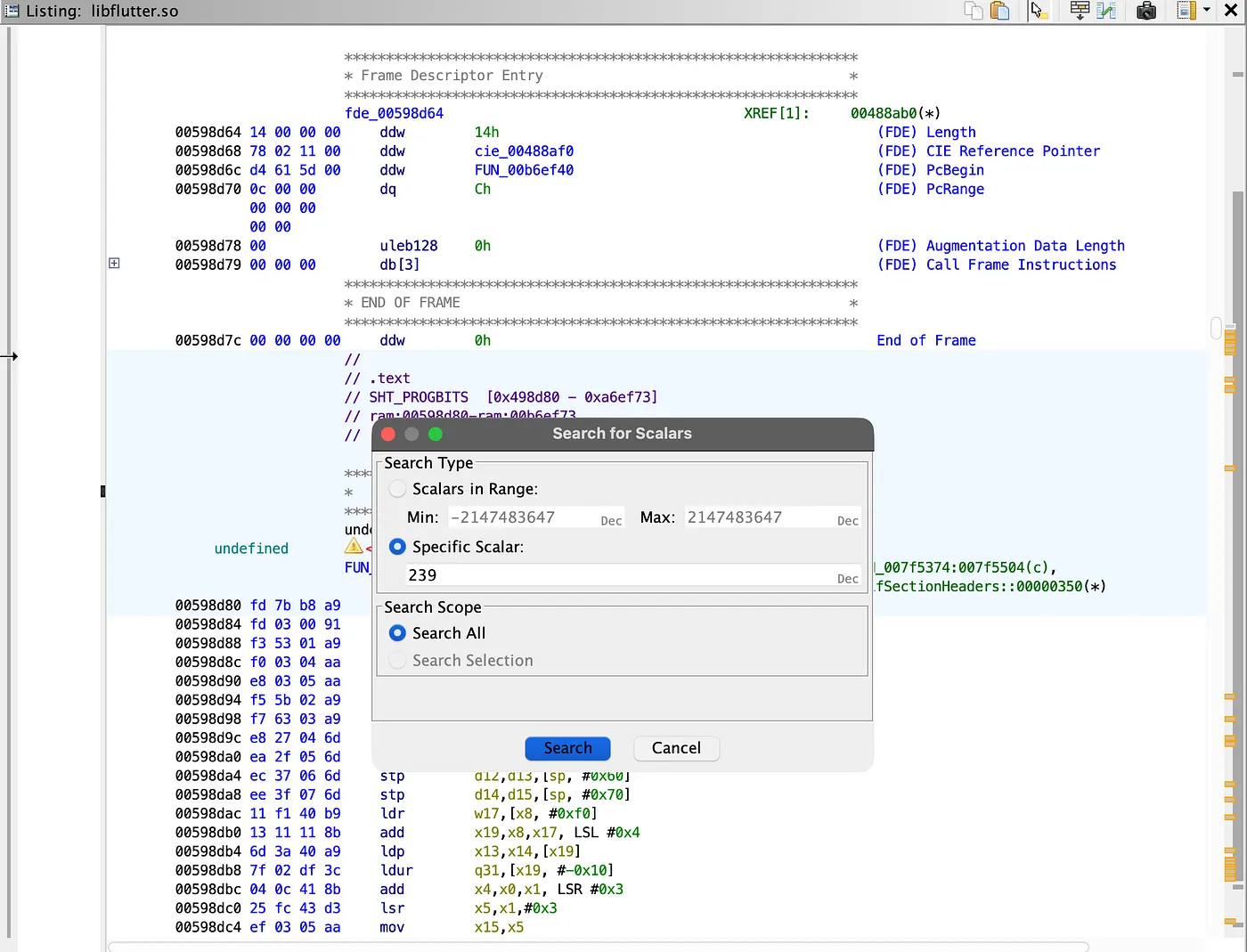
Search for Scalars
- The results will show places using that constant.
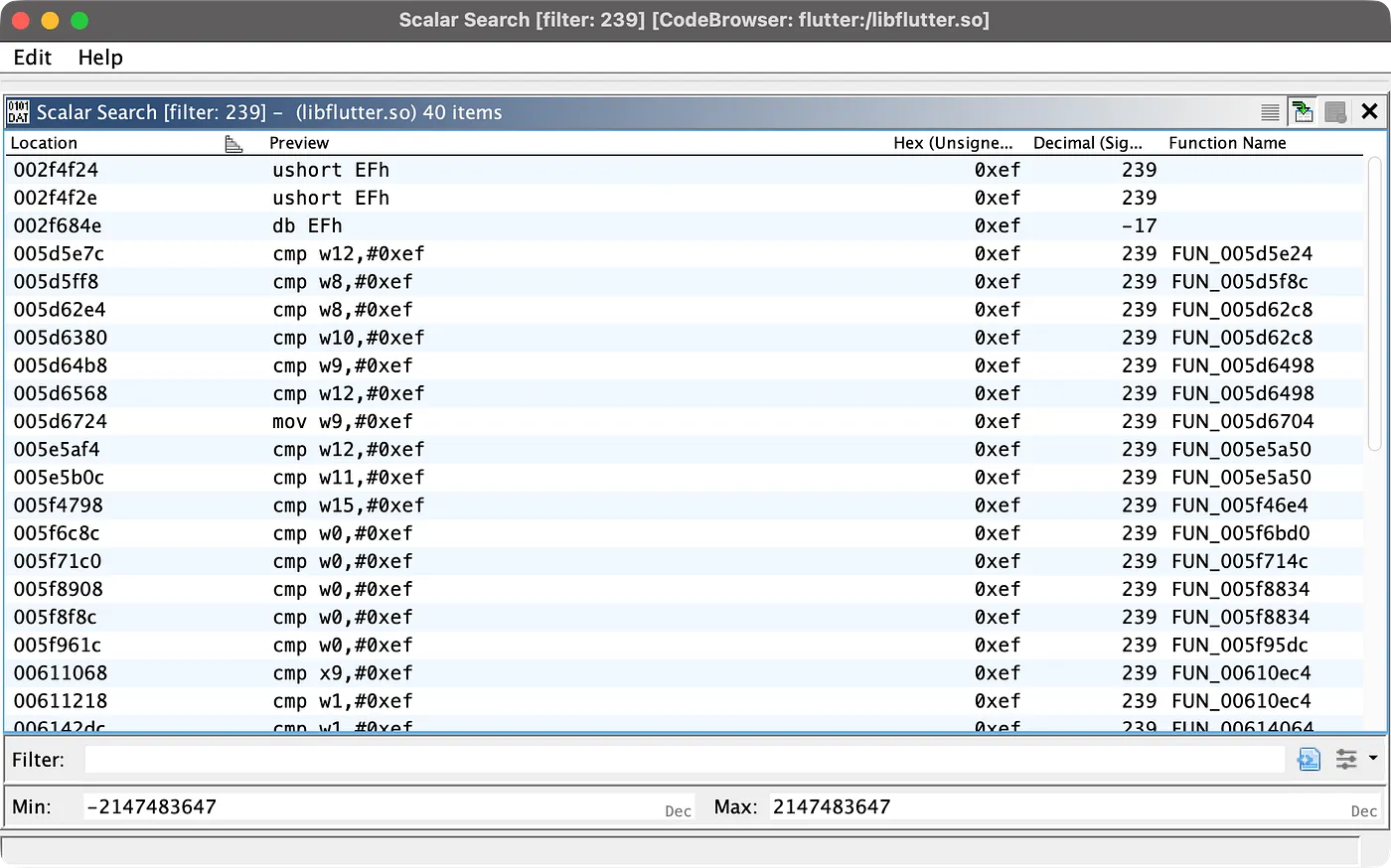
Result for 239 scalar search
- Filter by
movinstructions.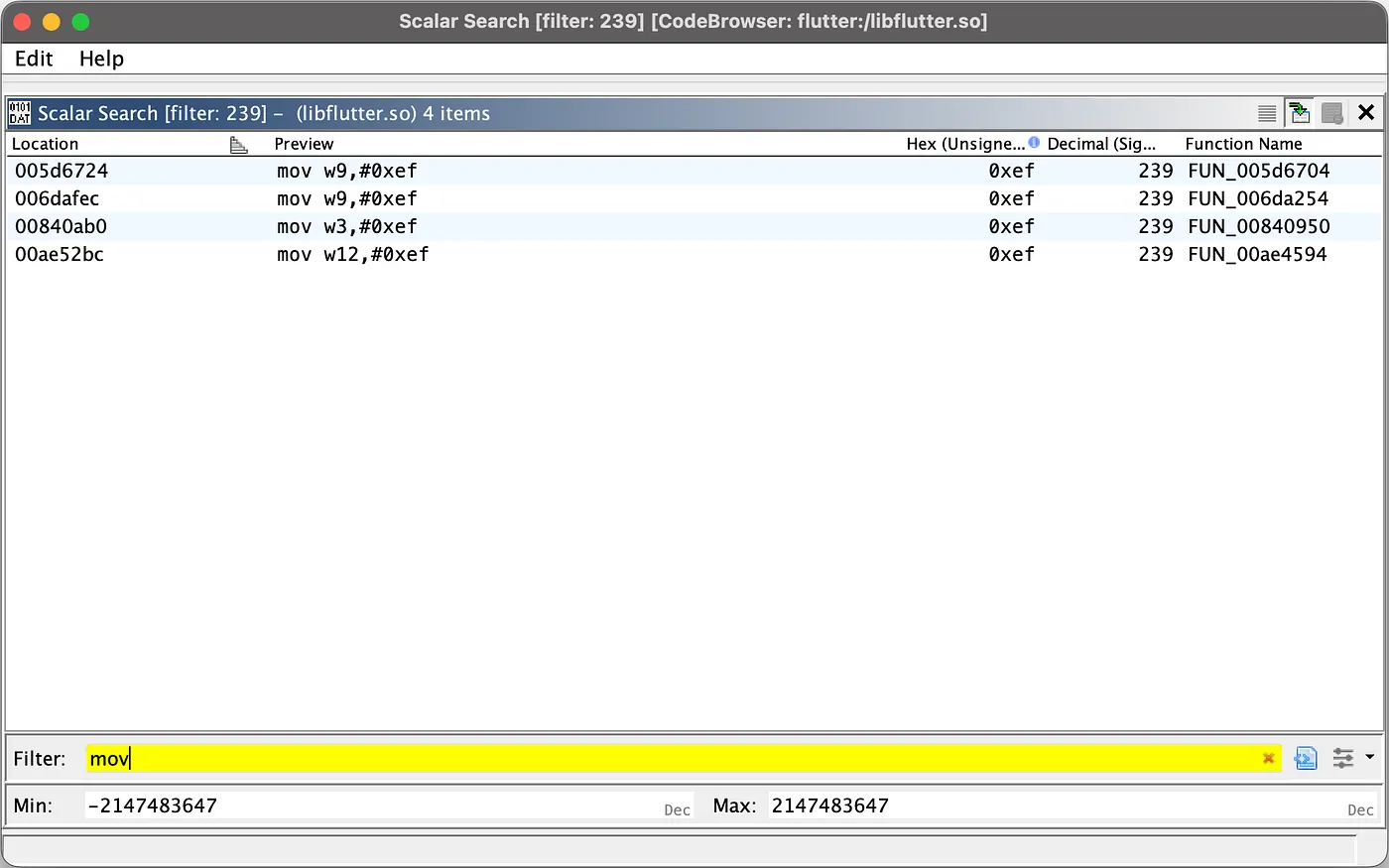
Filter by mov instruction
- Click through candidates until the decompiler shows a function with 3 parameters that matches the BoringSSL signature above.
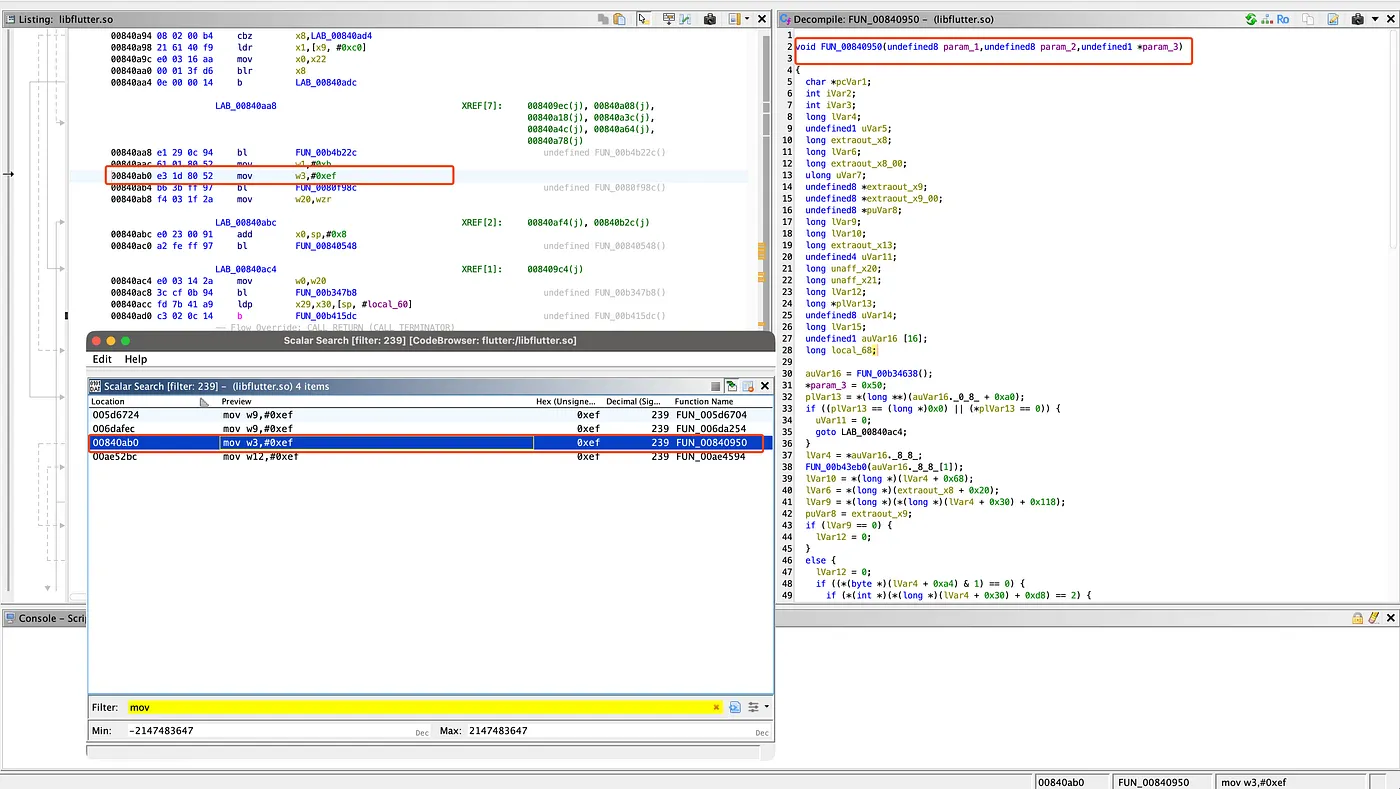
In this case, the candidate function appears in Ghidra as:
void FUN_00840950(undefined8 param_1,undefined8 param_2,undefined1 *param_3)
{
  char *pcVar1;
  int iVar2;
  int iVar3;
  long lVar4;
  undefined1 uVar5;
  long extraout_x8;
  long lVar6;
  long extraout_x8_00;
  ulong uVar7;
  undefined8 *extraout_x9;
----------STRIPPED------
This is a strong candidate because the function has three parameters, which matches the source signature:
static bool ssl_crypto_x509_session_verify_cert_chain(
    SSL_SESSION *session,
    SSL_HANDSHAKE *hs,
    uint8_t *out_alert)
In the compiled binary, argument types are not preserved, so Ghidra only marks an argument as a pointer when it can prove pointer‑style usage. That is why the source shows three pointers while the decompiler may show two raw 64‑bit arguments and one pointer. The count and usage still match the source, which makes this candidate more convincing.
After we identify a candidate from the mov results, double‑click the function(FUN_00840950) in the decompiler to jump to its address.
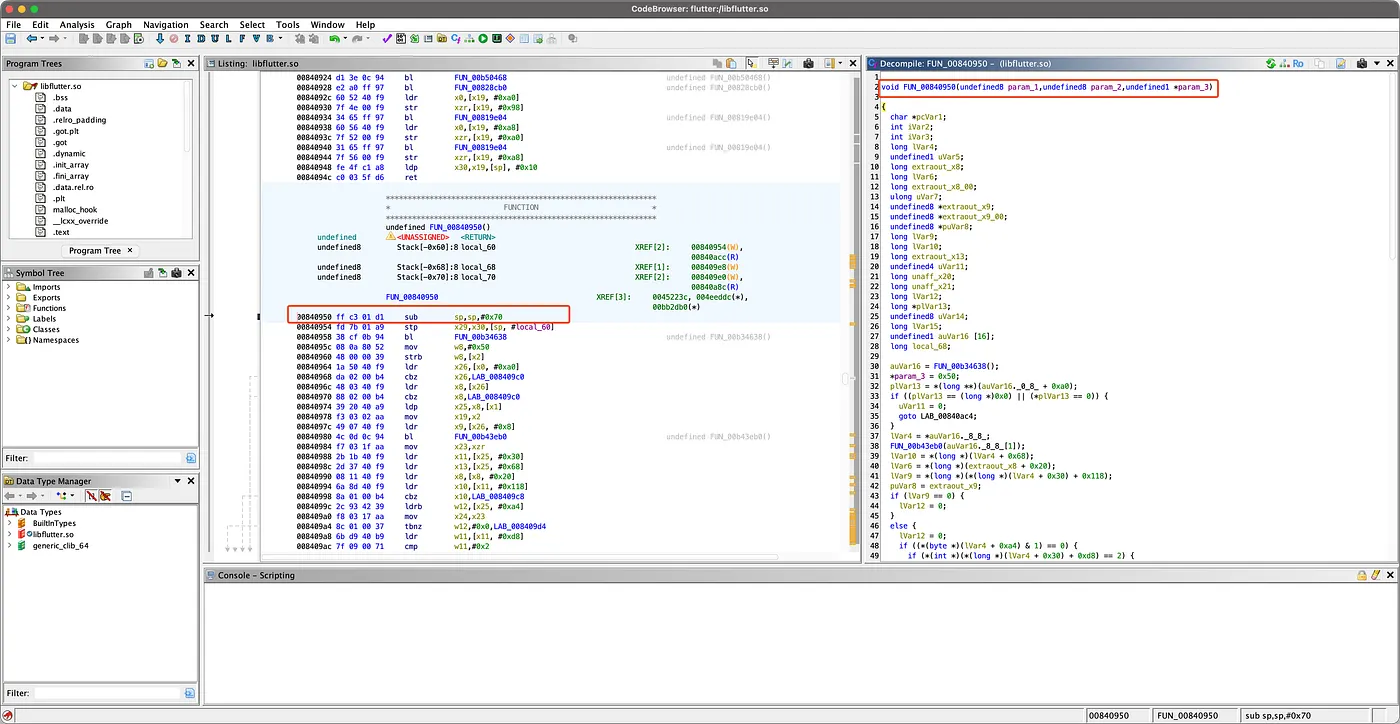
We know that the address is 0x00840950.Keep this address, because we will use it to compute the final offset.
6. Convert the Ghidra Address to a Frida Offset
The address shown by Ghidra is an absolute address based on the image base used during analysis. Frida needs a module-relative offset from the loaded base address of libflutter.so.
Find the image base used by Ghidra, because the function address you see in Ghidra is an absolute address that includes this base. The Frida hook needs a module offset, so we subtract the image base to get the final offset. Open Window → Memory Map and read the Image Base value. In the Memory Map window, the header shows Image Base: 00100000 (so the base is 0x100000).
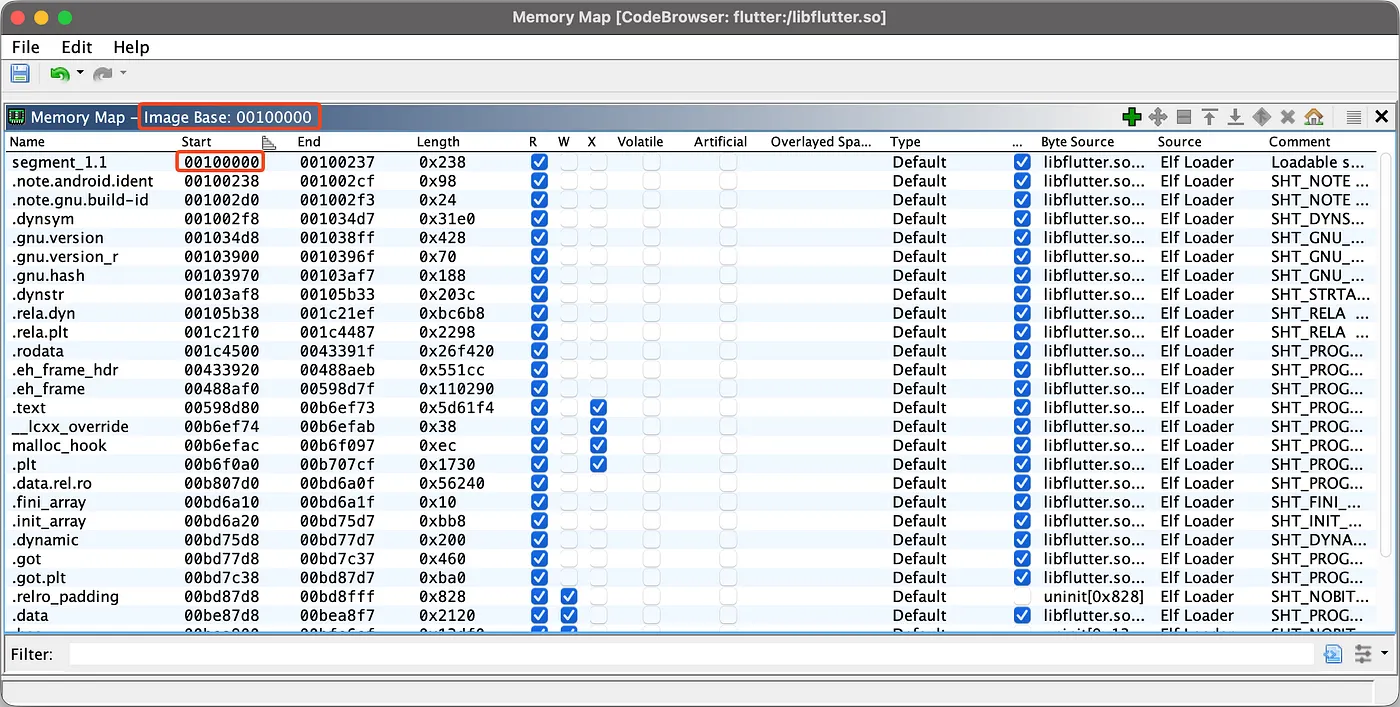
We can compute the final offset using this formula FUNCTION_ADDRESS — 0x00100000:
0x00840950 — 0x00100000 = 0x00740950So our final offset: 0x00740950
6. Hook the function with Frida
Before the hook is applied, HTTPS requests fail because the application rejects the proxy certificate.
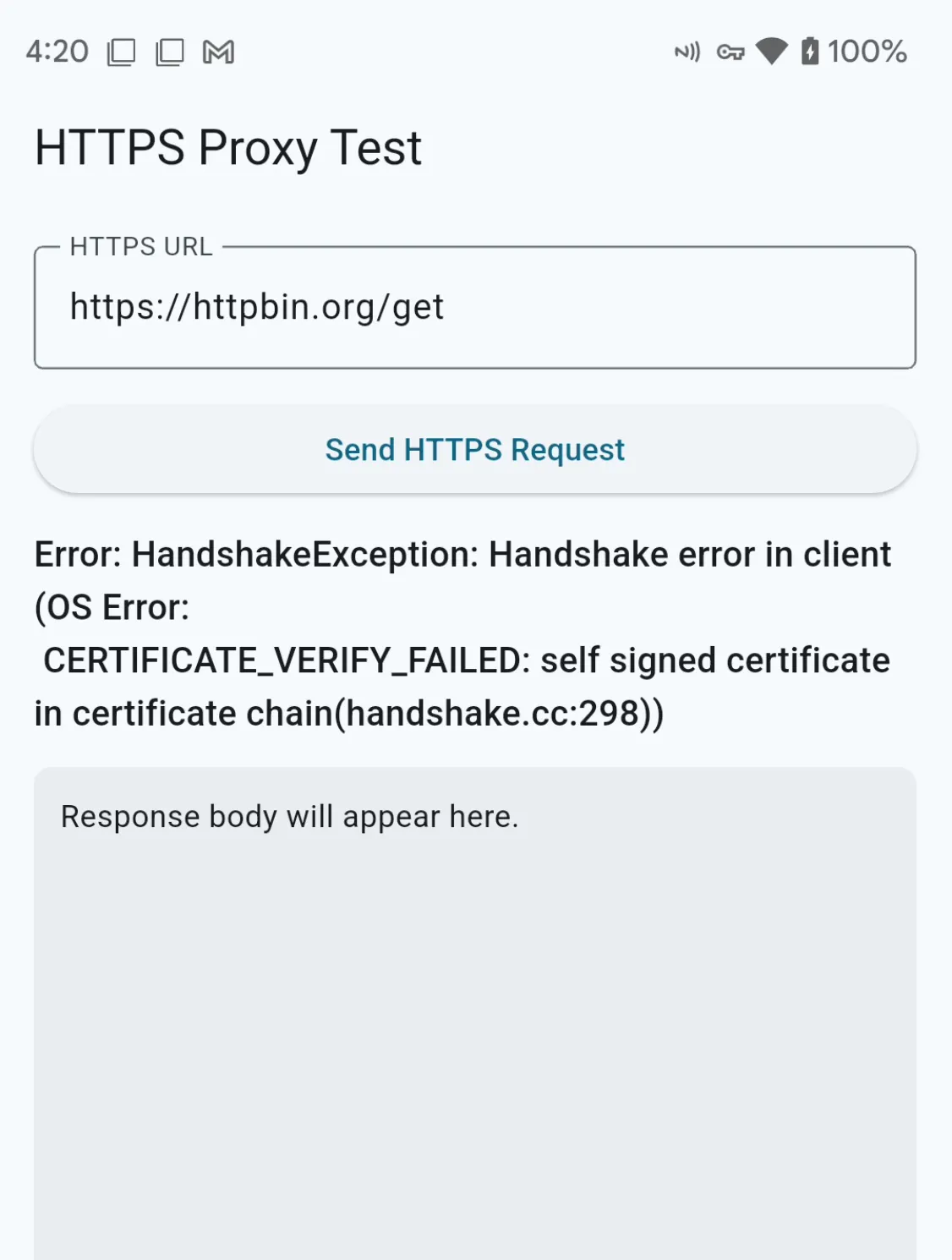
Use Frida to hook the verification function and force it to return success. Replace <OFFSET> with the offset from our offset calculation above:
function attachNow() {
    var module = Process.findModuleByName("libflutter.so");
    if (!module) return false;

    console.log(`[+] libflutter is loaded at ${module.base}`);
    session_verify_cert_chain(module.base.add(<OFFSET>));
    return true;
}

function session_verify_cert_chain(address) {
    Interceptor.attach(address, {
        onLeave: function (retval) {
            retval.replace(0x1);
            console.log(`[+] session_verify_cert_chain retval: ${retval}`);
        }
    });
}

if (!attachNow()) {
    var do_dlopen = null;
    var call_constructor = null;

    Process.findModuleByName("linker64").enumerateSymbols().forEach(function (symbol) {
        if (symbol.name.indexOf("do_dlopen") >= 0) {
            do_dlopen = symbol.address;
        }
        if (symbol.name.indexOf("call_constructor") >= 0) {
            call_constructor = symbol.address;
        }
    });

    if (!do_dlopen || !call_constructor) {
        console.log("[-] Could not find do_dlopen/call_constructor");
    } else {
        var lib_loaded = false;

        Interceptor.attach(do_dlopen, function () {
            var library_path = this.context.x0.readCString();
            if (library_path.indexOf("libflutter.so") >= 0) {
                Interceptor.attach(call_constructor, function () {
                    if (!lib_loaded) {
                        lib_loaded = true;
                        attachNow();
                    }
                });
            }
        });
    }
}
Run frida-ps to get the package name
❯ frida-ps -Ua | grep flutter
18665 flutter_ssl_project com.example.flutter_ssl_project
Run frida and attach to the current process by package name:
❯ frida -U -p $(frida-ps -Ua | grep com.example.flutter_ssl_project | awk '{print $1}') -l fluter_ssl_verif.js
     ____
    / _  |   Frida 17.8.2 - A world-class dynamic instrumentation toolkit
   | (_| |
    > _  |   Commands:
   /_/ |_|       help      -> Displays the help system
   . . . .       object?   -> Display information about 'object'
   . . . .       exit/quit -> Exit
   . . . .
   . . . .   More info at https://frida.re/docs/home/
   . . . .
   . . . .   Connected to M2007J20CG (id=aded592c)

Attaching...
[+] libflutter is loaded at 0x7a3805b000
[M2007J20CG::PID::18665 ]->
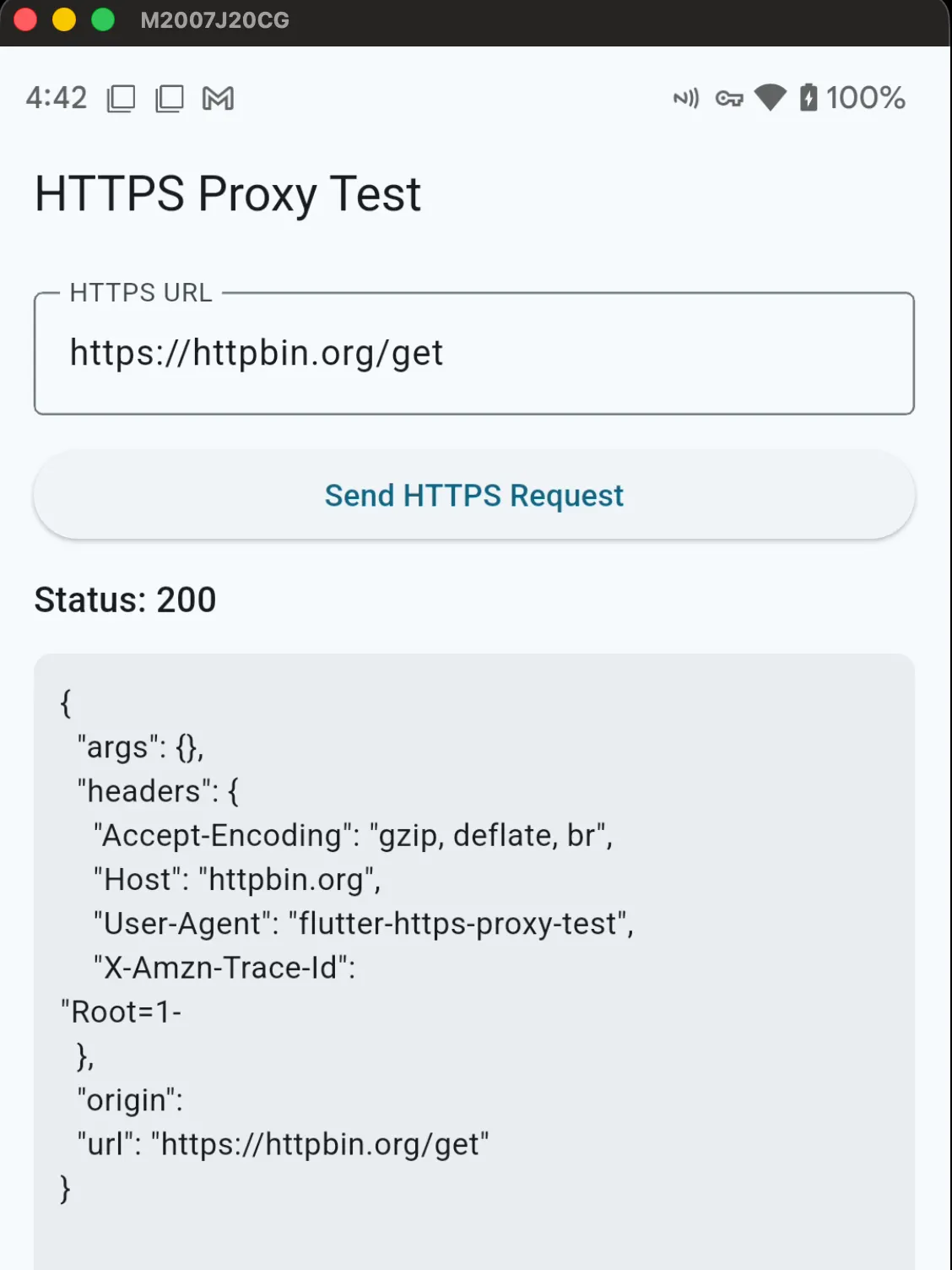
Trigger an HTTPS request from the application using Send HTTPS Request button. If the correct function has been hooked, the Frida console should show a log similar to this:
[M2007J20CG::PID::18665 ]-> [+] session_verify_cert_chain retval: 0x1If you do not see it, re-check the function address and base offset.
The app should be able to send HTTPS Request after we hook the session_verify_cert_chain.
Troubleshooting
No Frida log appears after sending HTTPS traffic
Re-check the calculated offset. Confirm that the Ghidra address was converted by subtracting the image base, not by using the raw Ghidra address directly.
Also confirm that the loaded library is really libflutter.so and that the process has not spawned a different architecture or process name.
The app crashes immediately after attaching Frida
If the offset and target function are correct but the app still crashes after Frida attaches, the crash may be caused by RASP, anti-Frida, anti-debugging, or anti-tampering controls rather than the TLS hook itself.
Validate this by attaching Frida without loading the TLS bypass script. If the app still crashes, the issue is likely related to instrumentation detection. A practical way to isolate the trigger is to test in stages: run the app normally, attach Frida without a script, attach Frida with a minimal logging script, then attach Frida with the TLS hook.
If the crash occurs before the TLS hook runs, handle the RASP or anti-instrumentation behavior first. The TLS bypass should only be debugged after the app can run stably under instrumentation.
The hook runs, but traffic still does not appear in Burp
The TLS verification bypass may be working, but traffic routing may still be incorrect. Check proxy configuration, Android network security settings, VPN or Zscaler routing, Burp listener binding, and whether the application ignores system proxy settings.
For Flutter apps, it is also common to combine this TLS bypass with traffic redirection techniques such as adb reverse, iptables redirection, or application-specific proxy forcing depending on the test environment.
The source function does not look exactly the same
BoringSSL changes over time. Different Flutter versions may use slightly different source code, line numbers, or function layouts. Always resolve the BoringSSL revision from the matching Flutter source instead of copying offsets from another app or another Flutter version.
Conclusion
When reFlutter cannot process a Flutter APK, the TLS/SSL verification bypass can still be performed manually. The key is to avoid guessing offsets. By identifying the exact Flutter engine version, resolving the matching BoringSSL revision, locating the certificate-chain verification routine in libflutter.so, and converting the Ghidra address into a Frida module offset, the hook can be built in a repeatable and reliable way.
This approach is especially useful for unsupported Flutter engine hashes, debug Flutter builds, and cases where automated patching is not possible.
Originally published on Medium.