If you have ever looked at an APK and asked, “What was this app built with?”, you already know the pain point this tool solves.
Sometimes you get source code. Most of the time you do not. You get a binary, maybe from a test build, maybe from a client, maybe from a bug bounty target, and you need quick context before doing deeper analysis.
I built APK-FiD for a very specific problem: you have an APK, no source code, and you need to know what stack sits underneath before you spend hours digging.
How it works
APK-FiD opens the APK as a ZIP archive and scans file entries. Each framework has a rule made of multiple signals, each signal has a score, and each framework has a minimum score to pass.
So it is not “found one file, case closed.” It is weighted matching across several clues.
That design helps avoid noisy guesses. A single common artifact should not be enough to call a framework. A cluster of matching artifacts should.
What you get back
You can output in plain text or JSON.
The report includes:
- framework name
- score
- confidence percent
- confidence tier (low, medium, high)
- matched signals
- matched files
- signal-level evidence grouped by match
The evidence part is important. You can verify why something was flagged without trusting a black box.
Framework coverage
The built-in rules already cover a wide range: React Native, Flutter, Ionic/Cordova, Ionic/Capacitor, NativeScript, Unity, Unreal, Xamarin/.NET for Android, Godot, Defold, and more.
It is broad enough for day-to-day triage, and still simple to extend.
Extend detection without touching code
You can add your own signatures with rules and keep everything in JSON. No code changes needed.
That is useful when you deal with:
- internal SDK wrappers
- partner-specific app templates
- uncommon engines in your target set
You can tune thresholds and scores to match your own environment instead of forcing one global rule set. Here is example rule template:
{
  "rules": [
    {
      "framework": "MyFramework",
      "min_score": 60,
      "signals": [
        { "needle": "assets/myfw/config.json", "score": 60 },
        { "needle": "lib/arm64-v8a/libmyfw.so", "score": 40 }
      ]
    }
  ]
}
Use case
In practice, I use APK-FiD as a time saver before deeper analysis.
A few examples:
- Security triage: quickly classify app stacks across many APKs
- Bug bounty prep: prioritize targets based on framework attack surface
- Incident response: identify technology fingerprints from recovered artifacts
Download
You can grab prebuilt binaries from the GitHub Releases page: APK-FiD releases.
If there is no release for your platform, or you just prefer building it yourself, clone the repo and compile it locally:
git clone https://github.com/aancw/APK-FiD
cd APK-FiD
cargo build --release
After that, the binary will be in target/release/apk_fid.
Quick usage
❯ ./apk_fid --help
Give me your APK, I will give you framework name

Usage: apk_fid [OPTIONS] --file <FILE>

Options:
  -f, --file <FILE>      Android APK file location, or folder containing APK files
  -o, --output <OUTPUT>  Output format: text or json [default: text] [possible values: text, json]
  -r, --rules <RULES>    Optional JSON file containing extra framework signatures
  -h, --help             Print help
  -V, --version          Print version

apk_fid -f app.apk
apk_fid -f folder/
apk_fid -f app.apk -o text
apk_fid -f app.apk -o json
apk_fid -f app.apk -r custom_rules.json
If no framework passes its minimum score, the tool marks it as unknown or native Android. That is still useful information. It tells you the signature set did not produce a confident hit.
APK-FiD is intentionally focused. It will not replace full static analysis, but it gives you a strong starting point in seconds, with evidence you can inspect immediately.
In this case, I ran APK-FiD against app-release.apk to see what framework it was using.
❯ ./apk_fid -f app-release.apk

     /$$$$$$  /$$$$$$$  /$$   /$$       /$$$$$$$$ /$$ /$$$$$$$
    /$$__  $$| $$__  $$| $$  /$$/      | $$_____/|__/| $$__  $$
   | $$  \ $$| $$  \ $$| $$ /$$/       | $$       /$$| $$  \ $$
   | $$$$$$$$| $$$$$$$/| $$$$$/ /$$$$$$| $$$$$   | $$| $$  | $$
   | $$__  $$| $$____/ | $$  $$|______/| $$__/   | $$| $$  | $$
   | $$  | $$| $$      | $$\  $$       | $$      | $$| $$  | $$
   | $$  | $$| $$      | $$ \  $$      | $$      | $$| $$$$$$$/
   |__/  |__/|__/      |__/  \__/      |__/      |__/|_______/

   Give me your APK
   I will give you framework name
   by Petruknisme

[*] Using app-release.apk as input file
[*] Loaded rules: 18 (custom: 0)
[*] APK entries scanned: 417
[*] Detecting framework(s)...
[*] Possible Framework Detected:

[1] Flutter
    confidence : 85% [high]
    score      : 110
    signals    : libflutter.so, flutter_assets
    evidence   :
      - libflutter.so (3 matches)
          lib/arm64-v8a/libflutter.so
          lib/armeabi-v7a/libflutter.so
          lib/x86_64/libflutter.so
      - flutter_assets (11 matches)
          assets/flutter_assets/AssetManifest.bin
          assets/flutter_assets/FontManifest.json
          assets/flutter_assets/NOTICES.Z
          assets/flutter_assets/NativeAssetsManifest.json
          assets/flutter_assets/fonts/MaterialIcons-Regular.otf
          assets/flutter_assets/packages/cupertino_icons/assets/CupertinoIcons.ttf
          assets/flutter_assets/shaders/ink_sparkle.frag
          assets/flutter_assets/shaders/stretch_effect.frag
          assets/flutter_assets/shorebird.yaml
If you want to scan multiple APKs inside a folder, point -fto that directory and APK-FiD will process every.apk file inside it.
❯ ./apk_fid -f samples

     /$$$$$$  /$$$$$$$  /$$   /$$       /$$$$$$$$ /$$ /$$$$$$$
    /$$__  $$| $$__  $$| $$  /$$/      | $$_____/|__/| $$__  $$
   | $$  \ $$| $$  \ $$| $$ /$$/       | $$       /$$| $$  \ $$
   | $$$$$$$$| $$$$$$$/| $$$$$/ /$$$$$$| $$$$$   | $$| $$  | $$
   | $$__  $$| $$____/ | $$  $$|______/| $$__/   | $$| $$  | $$
   | $$  | $$| $$      | $$\  $$       | $$      | $$| $$  | $$
   | $$  | $$| $$      | $$ \  $$      | $$      | $$| $$$$$$$/
   |__/  |__/|__/      |__/  \__/      |__/      |__/|_______/

   Give me your APK
   I will give you framework name
   by Petruknisme

[*] Processing APK file(s): 2
[*] Using samples/app-release.apk as input file
[*] Loaded rules: 18 (custom: 0)
[*] APK entries scanned: 417
[*] Detecting framework(s)...
[*] Possible Framework Detected:

[1] Flutter
    confidence : 85% [high]
    score      : 110
    signals    : libflutter.so, flutter_assets
    evidence   :
      - libflutter.so (3 matches)
          lib/arm64-v8a/libflutter.so
          lib/armeabi-v7a/libflutter.so
          lib/x86_64/libflutter.so
      - flutter_assets (11 matches)
          assets/flutter_assets/AssetManifest.bin
          assets/flutter_assets/FontManifest.json
          assets/flutter_assets/NOTICES.Z
          assets/flutter_assets/NativeAssetsManifest.json
          assets/flutter_assets/fonts/MaterialIcons-Regular.otf
          assets/flutter_assets/packages/cupertino_icons/assets/CupertinoIcons.ttf
          assets/flutter_assets/shaders/ink_sparkle.frag
          assets/flutter_assets/shaders/stretch_effect.frag
          assets/flutter_assets/shorebird.yaml

----------------------------------------
[*] Using samples/react.apk as input file
[*] Loaded rules: 18 (custom: 0)
[*] APK entries scanned: 342
[*] Detecting framework(s)...
[*] Possible Framework Detected:

[1] React Native
    confidence : 82% [high]
    score      : 90
    signals    : assets/index.android.bundle, libreactnativejni.so
    evidence   :
      - assets/index.android.bundle (1 matches)
          assets/index.android.bundle
      - libreactnativejni.so (2 matches)
          lib/armeabi-v7a/libreactnativejni.so
          lib/x86/libreactnativejni.so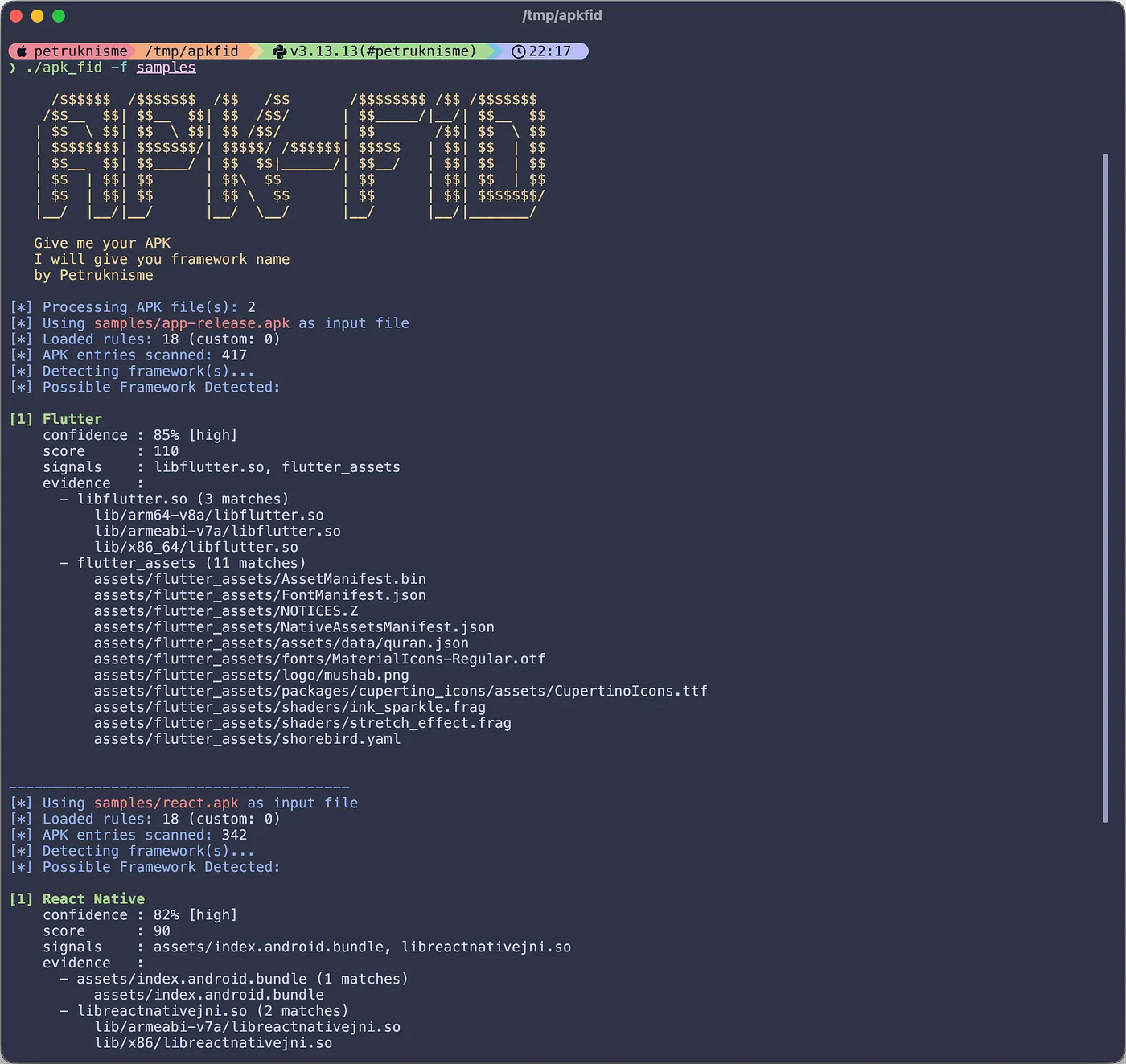
apk-fid when scanning multiple apk
If you want json output to combine with your existing tool, you can use -o json
❯ ./apk_fid -f app-release.apk -o json
{
  "detected": [
    {
      "framework": "Flutter",
      "score": 110,
      "confidence_pct": 85,
      "confidence_tier": "high",
      "matched_signals": [
        "libflutter.so",
        "flutter_assets"
      ],
      "matched_files": [
        "assets/flutter_assets/AssetManifest.bin",
        "assets/flutter_assets/FontManifest.json",
        "assets/flutter_assets/NOTICES.Z",
        "assets/flutter_assets/NativeAssetsManifest.json",
        "assets/flutter_assets/fonts/MaterialIcons-Regular.otf",
        "assets/flutter_assets/packages/cupertino_icons/assets/CupertinoIcons.ttf",
        "assets/flutter_assets/shaders/ink_sparkle.frag",
        "assets/flutter_assets/shaders/stretch_effect.frag",
        "assets/flutter_assets/shorebird.yaml",
        "lib/arm64-v8a/libflutter.so",
        "lib/armeabi-v7a/libflutter.so",
        "lib/x86_64/libflutter.so"
      ],
      "signal_evidence": [
        {
          "signal": "libflutter.so",
          "files": [
            "lib/arm64-v8a/libflutter.so",
            "lib/armeabi-v7a/libflutter.so",
            "lib/x86_64/libflutter.so"
          ]
        },
        {
          "signal": "flutter_assets",
          "files": [
            "assets/flutter_assets/AssetManifest.bin",
            "assets/flutter_assets/FontManifest.json",
            "assets/flutter_assets/NOTICES.Z",
            "assets/flutter_assets/NativeAssetsManifest.json",
            "assets/flutter_assets/fonts/MaterialIcons-Regular.otf",
            "assets/flutter_assets/packages/cupertino_icons/assets/CupertinoIcons.ttf",
            "assets/flutter_assets/shaders/ink_sparkle.frag",
            "assets/flutter_assets/shaders/stretch_effect.frag",
            "assets/flutter_assets/shorebird.yaml"
          ]
        }
      ]
    }
  ],
  "unknown_or_native_android": false,
  "inspected_entries": 417,
  "rules_loaded": 18,
  "custom_rules_loaded": 0
}
What this tells us:
- APK-FiD scanned 417 entries inside the APK.
- It matched enough Flutter signals to pass the threshold with 85% high confidence.
- The result is not a blind guess, because it shows exact evidence files (libflutter.so and flutter_assets paths).
- Since custom: 0, this detection came purely from built-in rules.
Final note
APK-FiD is built for quick triage when you need to identify the framework behind an APK without digging through the whole app by hand. It scans the package, matches multiple signals, and gives you a result that is easy to read and easy to verify.
That makes it useful whether you are checking a single APK, scanning a folder of apps, or feeding the output into a script. In practice, it gives you a fast starting point, clear evidence, and less guesswork before deeper analysis.
GitHub - aancw/APK-FiD: Give me your APK, I will give you framework name
Give me your APK, I will give you framework name. Contribute to aancw/APK-FiD development by creating an account on…
github.com
Originally published on Medium.